Private asset delivery
S3 presigned downloads
Day Six #
The application can accept and process a private upload, but it exposes downloads through a public CloudFront path. Anybody who learns that path can fetch the asset.
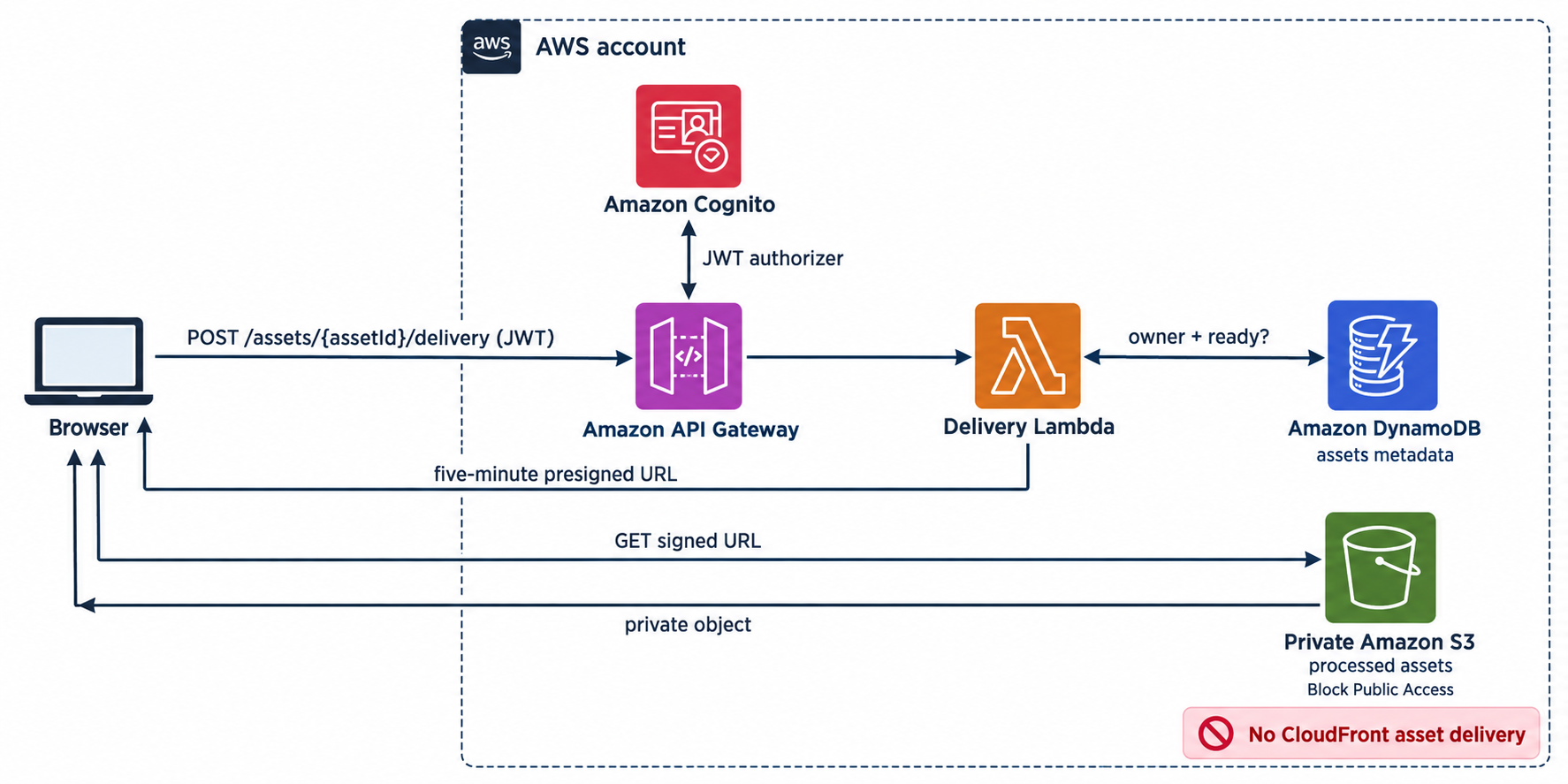
Today we close that gap. A signed-in owner asks the API for access to one ready asset. The API checks the durable ownership record and returns a five-minute S3 presigned GET URL.
The AWS SDK still signs the request, but it uses the Lambda execution role's temporary credentials. AWS supplies and rotates those credentials. The application owns no private-key file, CloudFront key group, or Secrets Manager secret.
Goal #
For every preview environment:
- keep originals and processed objects private in S3
- remove public delivery of processed assets from CloudFront
- authorize the owner from the Cognito subject and DynamoDB record
- return a URL for one exact S3 object that expires after five minutes
- let IAM define the maximum objects the delivery Lambda can grant
- keep AWS credentials and durable URLs out of the browser
The result is a smaller operating model. Cognito identifies the caller, DynamoDB says whether that identity owns the asset, IAM limits the signing Lambda to processed output, and S3 enforces the temporary grant.
The private delivery flow #
High-level AWS architecture #
The delivery API authorizes an owner against the asset record, then returns a five-minute URL for one processed S3 object. The browser uses that temporary grant directly with S3.
Authorization and delivery flow #
The detailed sequence traces the ownership check, temporary URL signing, and direct S3 download:
There are two separate decisions:
- The application decides who may receive a grant. Cognito and the asset record answer that question.
- S3 decides whether this request carries a valid grant. Signature Version 4, the expiry, and the Lambda role's permissions answer that question.
A JWT cannot fetch an object directly, and the caller never supplies the S3 key that gets signed.
S3 instead of CloudFront #
CloudFront signed URLs are valuable when globally cached delivery, custom domains, or sustained download volume justify them. They also require a public-private key pair whose private half the application must protect and rotate.
That is more machinery involved. S3 presigned URLs use the execution role credentials Lambda already has. There is no extra key lifecycle and no secret read during a request.
The trade-off is explicit: each private download comes from S3 instead of a CloudFront edge cache. That is a reasonable default for small private assets and preview environments. If delivery volume or global latency later becomes material, that product requirement can justify a CDN and its signing-key lifecycle.
A presigned URL is still a bearer credential. Anybody who receives it can use it until it expires. Keep its lifetime short and do not put it in logs, analytics, or persistent browser storage.
Remove public asset delivery #
We have an /assets/* behavior for the site distribution. Remove it completely:
additionalBehaviors: {
  '/assets/*': {
    // remove this entire behavior
  },
},
The site distribution returns to serving only the static site bucket:
const distribution = new cloudfront.Distribution(this, 'SiteDistribution', {
  defaultRootObject: 'index.html',
  defaultBehavior: {
    origin: origins.S3BucketOrigin.withOriginAccessControl(siteBucket),
    viewerProtocolPolicy: cloudfront.ViewerProtocolPolicy.REDIRECT_TO_HTTPS,
    cachePolicy: cloudfront.CachePolicy.CACHING_OPTIMIZED,
  },
  errorResponses: [
    { httpStatus: 403, responseHttpStatus: 200, responsePagePath: '/index.html' },
    { httpStatus: 404, responseHttpStatus: 200, responsePagePath: '/index.html' },
  ],
});
The asset bucket remains private with Block Public Access enabled. Removing the CloudFront origin also removes its reason to read processed objects; only the worker and narrowly scoped delivery Lambda retain access.
Add the presigner #
Add the small Signature Version 4 presigner package:
npm install @aws-sdk/s3-request-presigner
Bundle it with NodejsFunction. Do not rely on whichever SDK version happens to be present in the managed Lambda runtime. The current SDK packages require Node.js 20, so use node-version: '20' in the preview workflow as well as the NODEJS_20_X Lambda runtime.
Create the delivery Lambda #
The function reads one asset record, checks the authenticated owner, requires ready, and signs the output key written by the worker.
lambda/create-delivery/index.ts
import { DynamoDBClient } from '@aws-sdk/client-dynamodb';
import { DynamoDBDocumentClient, GetCommand } from '@aws-sdk/lib-dynamodb';
import { GetObjectCommand, S3Client } from '@aws-sdk/client-s3';
import { getSignedUrl } from '@aws-sdk/s3-request-presigner';

const db = DynamoDBDocumentClient.from(new DynamoDBClient({}));
const s3 = new S3Client({});
const ttlSeconds = 5 * 60;

export const handler = async (event: any) => {
  const assetId = event?.pathParameters?.assetId;
  const ownerId = event?.requestContext?.authorizer?.jwt?.claims?.sub;

  if (!ownerId) return reply(401, { error: 'Authentication is required' });
  if (!assetId) return reply(400, { error: 'assetId is required' });

  const { Item: asset } = await db.send(new GetCommand({
    TableName: requiredEnv('ASSETS_TABLE_NAME'),
    Key: { assetId },
    ConsistentRead: true,
    ProjectionExpression: 'assetId, ownerId, #status, outputKey',
    ExpressionAttributeNames: { '#status': 'status' },
  }));

  const decision = decideDelivery(asset, ownerId, assetId);
  if (decision.status === 'not-found') {
    return reply(404, { error: 'Asset not found' });
  }
  if (decision.status === 'not-ready') {
    return reply(409, { error: 'Asset is not ready' });
  }

  const expiresAt = new Date(Date.now() + ttlSeconds * 1_000);
  const url = await getSignedUrl(
    s3,
    new GetObjectCommand({
      Bucket: requiredEnv('ASSET_BUCKET_NAME'),
      Key: decision.outputKey,
    }),
    { expiresIn: ttlSeconds },
  );

  return reply(200, {
    delivery: {
      url,
      expiresAt: expiresAt.toISOString(),
    },
  });
};

export const decideDelivery = (asset: any, ownerId: string, assetId: string) => {
  if (!asset || asset.ownerId !== ownerId) {
    return { status: 'not-found' } as const;
  }
  if (asset.status !== 'ready' || !asset.outputKey) {
    return { status: 'not-ready' } as const;
  }

  const expectedPrefix = `processed/assets/${assetId}.`;
  if (typeof asset.outputKey !== 'string' || !asset.outputKey.startsWith(expectedPrefix)) {
    throw new Error(`Unexpected output key for asset ${assetId}`);
  }

  return { status: 'ready', outputKey: asset.outputKey } as const;
};

const reply = (statusCode: number, body: unknown) => ({
  statusCode,
  headers: {
    'content-type': 'application/json',
    'cache-control': 'no-store',
  },
  body: JSON.stringify(body),
});

const requiredEnv = (name: string) => {
  const value = process.env[name];
  if (!value) throw new Error(`${name} is not configured`);
  return value;
};
Returning 404 for both a missing asset and somebody else's asset avoids exposing which asset IDs exist. An owner who asks before processing finishes receives 409, allowing the page to continue polling the status endpoint.
The key comes from DynamoDB. decideDelivery keeps the authorization decision separate from AWS calls so it can be tested directly. Its prefix check ensures a corrupt record cannot turn this function into a signer for originals or unrelated bucket content.
The reference implementation tests missing assets, ownership mismatch, non-ready state, the deterministic ready key, and a record that points outside processed output. Run them with the rest of the TypeScript build:
npm test
S3 permission #
Add the IAM import:
import * as iam from 'aws-cdk-lib/aws-iam';
Create the function with the table and bucket names it needs:
const createDelivery = new lambdaNodejs.NodejsFunction(this, 'CreateDeliveryFunction', {
  runtime: lambda.Runtime.NODEJS_20_X,
  entry: join(__dirname, '../lambda/create-delivery/index.ts'),
  handler: 'handler',
  timeout: cdk.Duration.seconds(5),
  memorySize: 256,
  environment: {
    ASSETS_TABLE_NAME: assets.tableName,
    ASSET_BUCKET_NAME: assetBucket.bucketName,
  },
});

assets.grantReadData(createDelivery);
createDelivery.addToRolePolicy(new iam.PolicyStatement({
  actions: ['s3:GetObject'],
  resources: [assetBucket.arnForObjects('processed/assets/*')],
}));
The presigned request carries the delivery Lambda role's authority, so a URL succeeds only for an operation that role may perform. Granting only s3:GetObject on processed/assets/* means the function cannot produce a usable download URL for uploads/originals/*, even if a code defect tries.
The function has no permission to list the bucket, write objects, update asset records, or fetch original uploads.
Signature age #
The application asks for five minutes. Add a bucket-policy backstop that rejects processed-object requests with a SigV4 signature older than six minutes. The extra minute avoids making the policy and SDK expiry compete at the exact boundary.
Add the deny statement using the same IAM import:
assetBucket.addToResourcePolicy(new iam.PolicyStatement({
  sid: 'DenyStaleProcessedAssetSignatures',
  effect: iam.Effect.DENY,
  principals: [new iam.AnyPrincipal()],
  actions: ['s3:GetObject'],
  resources: [assetBucket.arnForObjects('processed/assets/*')],
  conditions: {
    NumericGreaterThan: {
      's3:signatureAge': 6 * 60 * 1_000,
    },
  },
}));
s3:signatureAge is measured in milliseconds. This is defense in depth: the URL's own five-minute expiry remains the normal limit.
Expose the asset bucket name for operator verification. The name is configuration, not a credential:
new cdk.CfnOutput(this, 'AssetBucketName', { value: assetBucket.bucketName });
Authenticated route #
Add one route to the existing HTTP API:
api.addRoutes({
  path: '/assets/{assetId}/delivery',
  methods: [apigwv2.HttpMethod.POST],
  integration: new integrations.HttpLambdaIntegration(
    'CreateDeliveryIntegration',
    createDelivery,
  ),
  authorizer: userAuthorizer,
});
API Gateway verifies the Cognito token before Lambda runs. The function still checks that the verified sub owns the requested asset; authentication without object-level authorization is not enough.
Asset response #
Remove the permanent CloudFront url for ready assets. The status API can report ready, but it must not expose an unsigned delivery path.
The ready response becomes:
{
  "asset": {
    "assetId": "307d0b55-05d1-4c0f-a0fb-4c3e1083e3df",
    "status": "ready",
    "contentType": "image/png",
    "createdAt": "2026-07-19T11:20:42.000Z"
  }
}
The browser requests a delivery URL only when it needs to show or download the asset:
const requestDelivery = async (assetId) => {
  const response = await fetch(
    `${config.apiBaseUrl}/assets/${encodeURIComponent(assetId)}/delivery`,
    {
      method: 'POST',
      headers: { authorization: `Bearer ${idToken}` },
      cache: 'no-store',
    },
  );

  const data = await response.json();
  if (!response.ok) throw new Error(data.error || `HTTP ${response.status}`);
  return data.delivery;
};

const asset = await waitForAsset(assetId);
if (asset.status === 'ready') {
  status.textContent = `Authorizing delivery for ${asset.assetId}…`;
  const delivery = await requestDelivery(asset.assetId);
  image.src = delivery.url;
  image.hidden = false;
  status.textContent = `Asset ${asset.assetId}: ready`;
}
An image element can load the presigned URL without giving JavaScript access to the response body. If the application later uses fetch, reads response headers, or draws the image to a canvas, add GET and the exact site origin to the asset bucket's CORS rule. CORS is a browser rule, not an authorization mechanism.
Do not persist the URL in local storage. Request a new one after a reload or when the previous grant expires.
Verify the boundary #
Deploy the stack, sign in, upload a valid image, and wait until its state is ready. Resolve the values used below from the deployed stack:
STACK=Stack-PR123
REGION=us-east-1

PREVIEW_URL=$(aws cloudformation describe-stacks \
  --stack-name "$STACK" --region "$REGION" \
  --query "Stacks[0].Outputs[?OutputKey=='PreviewUrl'].OutputValue | [0]" \
  --output text)

ASSET_BUCKET_NAME=$(aws cloudformation describe-stacks \
  --stack-name "$STACK" --region "$REGION" \
  --query "Stacks[0].Outputs[?OutputKey=='AssetBucketName'].OutputValue | [0]" \
  --output text)

ASSETS_TABLE_NAME=$(aws cloudformation describe-stacks \
  --stack-name "$STACK" --region "$REGION" \
  --query "Stacks[0].Outputs[?OutputKey=='AssetsTableName'].OutputValue | [0]" \
  --output text)

API_BASE_URL=$(aws cloudformation describe-stacks \
  --stack-name "$STACK" --region "$REGION" \
  --query "Stacks[0].Outputs[?OutputKey=='AssetApiBaseUrl'].OutputValue | [0]" \
  --output text)
Take the asset ID from the page, then resolve its output key so the same commands work for PNG and JPEG:
ASSET_ID=307d0b55-05d1-4c0f-a0fb-4c3e1083e3df

OUTPUT_KEY=$(aws dynamodb get-item \
  --table-name "$ASSETS_TABLE_NAME" \
  --key "{\"assetId\":{\"S\":\"$ASSET_ID\"}}" \
  --consistent-read \
  --region "$REGION" \
  --query 'Item.outputKey.S' \
  --output text)
First confirm that the old CloudFront path no longer exposes the object:
SITE_BASE_URL=${PREVIEW_URL%%\?*}
DELIVERY_PATH=${OUTPUT_KEY#processed/}
curl -i "${SITE_BASE_URL}${DELIVERY_PATH}"
The site distribution must not return the asset. Depending on the SPA fallback, it may return the site's HTML; it no longer has an origin that can read the asset bucket.
Direct S3 access without a signature must fail:
curl -i "https://$ASSET_BUCKET_NAME.s3.$REGION.amazonaws.com/$OUTPUT_KEY"
Expect 403.
Ask the authenticated API for a delivery grant:
DELIVERY=$(curl --fail --silent \
  -X POST \
  -H "Authorization: Bearer $ID_TOKEN" \
  "$API_BASE_URL/assets/$ASSET_ID/delivery")

SIGNED_URL=$(jq -r '.delivery.url' <<< "$DELIVERY")
curl --fail --output downloaded-asset "$SIGNED_URL"
The simplest way to reuse the browser's token is to select the successful delivery request in DevTools and choose Copy as cURL. Do not paste that command into a shared log: it contains the JWT, and its response contains the temporary asset URL.
Verify the authorization cases as well:
- no JWT returns
401at API Gateway - another user's JWT receives
404 - an owned asset that is still processing receives
409 - a direct unsigned S3 request receives
403 - changing the object key or any signature parameter receives
403 - the URL works before expiry and fails after expiry
Do not print the signed URL in a shared CI log. Signing out prevents new grants, but it does not invalidate one already issued.
Operating model #
- The bucket remains private and Block Public Access stays enabled. A presigned URL grants one temporary
GetObject; it does not make the object public. - Lambda receives temporary role credentials from its runtime and the AWS SDK resolves them automatically. There is no application signing key to provision or rotate.
- The five-minute URL is shorter than the role session that created it. It expires at its configured time or when the underlying temporary credentials expire, whichever happens first.
- S3 checks expiry when a request begins. A download that starts before expiry can finish afterward, but a new or resumed request after expiry fails.
- Revoking a user's Cognito session prevents future grants. It cannot revoke a URL already issued; use a very short TTL for content that needs a small revocation window.
- Delivery logs should contain the asset ID and decision, never the JWT or presigned URL.
- Direct S3 delivery gives up CloudFront edge caching. Measure download volume and latency before accepting the operational cost of a separate CDN signing system.
Well-Architected Framework #
- Security: Cognito authenticates the API call, DynamoDB supplies ownership, IAM limits grants to processed objects, and S3 enforces an expiring SigV4 request.
- Operational Excellence: delivery decisions have an asset ID and explicit outcome, while bearer URLs and credentials stay out of logs.
- Reliability: the delivery path has no manually managed secret or signing-key rotation procedure that can drift from its verifier.
- Performance Efficiency: the file travels directly from S3 rather than through API Gateway or Lambda.
- Cost Optimization: one short Lambda invocation authorizes a download, with no Secrets Manager read or second CloudFront distribution.
- Sustainability: the application does not proxy asset bytes through compute; it adds only the control-plane work required to authorize access.