Module federation
The Webpack 5 release brought many improvements focused on optimization. Hopefully, it was the last major release that brings breaking changes[1]. But the most exciting feature introduced is module federation[2].
Motivation #
Module federation is about managing different physical parts of the application(s) at runtime. We already looked at this problem in the code splitting chapter. Back then, it was mostly about mitigating single‑bundle file size. Both static and dynamic split address the problem slightly differently with their own pros and cons. Module federation goes one step further and is not a substitute for code‑splitting techniques.
Multiple separate builds should form a single application. These separate builds should not have dependencies between each other, so they can be developed and deployed individually.
Legacy approaches #
From this dry explanation we can see that federation is about managing different bundles coming from different applications at runtime. The final result might look like a single application to the end user, but in reality we are talking about different physical apps with completely isolated/independent lifecycles.
In a more old‑fashioned setup, multiple bundles could be combined via iframes, a reverse proxy, or a script tag in the hosting HTML page[3]. All of these solutions require a specific communication mechanism between bundles (DOM lifecycle events, messages, session storage, etc.). With module federation, the mechanism stays the same as if the code were part of the original application. Components from different bundles can continue to communicate just like before. It’s webpack’s power and a configuration change that make it work.
Concepts #
Every webpack build ends with a bundle. As we know, it can be one file or multiple files (or an in‑memory bundle in dev mode). We can split a single‑file bundle into multiple files using chunks (dynamic split). Now, imagine that some of these chunks form a separate module. In the context of the same application this gives us little benefit beyond what we already have. But what if that module belongs to a bundle from a completely different application — a remote? That is exactly what module federation does for us. It can load a remote module as if it were local and plug it into the existing application lifecycle.
Local modules are normal modules which are part of the current build. Remote modules are modules that are not part of the current build and loaded from a so-called container at the runtime. Loading remote modules is considered asynchronous operation. When using a remote module these asynchronous operations will be placed in the next chunk loading operation(s) that is between the remote module and the entry point. It's not possible to use a remote module without a chunk loading operation.
So every application is a container of modules. It can provide modules, consume modules, or both. When it provides a module, that’s a local module to be consumed by another application as a remote. When it consumes a module, it’s a remote one that will be downloaded and evaluated to be consumed as a local one.
The exposed access is separated into two steps:
- loading the module (asynchronous)
- evaluating the module (synchronous).
Step 1 will be done during the chunk loading. Step 2 will be done during the module evaluation interleaved with other (local and remote) modules. This way, evaluation order is unaffected by converting a module from local to remote or the other way around.
Implementation #
Webpack exposes a set of plugins for implementing module federation. For simplicity, we’ll use the high‑level ModuleFederationPlugin. We’ll also create a second application that acts as a remote.
For our initial application, ModuleFederationPlugin will be used in both dev and prod builds, so it makes sense to implement it in parts.ts:
webpack/parts.ts #
import webpack, { container} from 'webpack'

const { ModuleFederationPlugin } = container

export const getParts = (): Parts => ({

 // ...

    plugins: ({ cleanVerbose, remoteAppUrl}) => {
        if(!remoteAppUrl) {
            throw new Error('Missing remoteAppUrl value')
        }

        return [
            // ...
            new ModuleFederationPlugin({
                name: "app1",
                remotes: {
                    app2: remoteAppUrl,
                },
            })
        ]
    }
})
We've extended plugins method with remoteAppUrl parameter indicating remote application URL providing modules to be consumed. For the plugin itself we have:
name- The name of the container. It's an optional field and is not needed for the consumer (our case), but it's a good practice anyway.remotes- an object indicating container locations from which modules should be resolved and loaded at runtime. Object key represents a remote module name as it will be used in a source code. Object value is a remote container location.
webpack/environments.js #
module.exports = (env) => {

    return {
        // ...

        get remoteAppUrl() {
            return process.env.REMOTE_APP_URL
        }
    }
}
Environments object was extended with the remoteAppUrl getter. REMOTE_APP_URL is passed by an environment variable mostly because chances are it would be different between local and prod configurations. For the local development it is a nice way to configure things in case specific ports are busy.
webpack/webpack.config.dev.ts #
import Environments from './environments'

const environment  = Environments()

const config: Configuration = {

    // ...

    plugins: [
        ...parts.plugins({
            cleanVerbose: true,
            remoteAppUrl: environment.remoteAppUrl || 'app2@http://localhost:8081/remoteEntry.js'
        }),
        // ...
    ],
First, we imported Environments to read remoteAppUrl parameter. Next, we are passing it to the plugins method with the convenient default value in case none was provided. Important thing to notice is that the URL starts with app2@. This value should match the remote container name we've setup in remotes section of the ModuleFederationPlugin.
webpack/webpack.config.ts #
import Environments from './environments'

const environment  = Environments()

const config: Configuration = {

    // ...

    plugins: [
        ...parts.plugins({
            remoteAppUrl: environment.remoteAppUrl
        }),
        // ...
    ],
Very similar implementation. This time we pass the value as is.
src/app/index.tsx #
Recall that remote modules work only via chunks. As a result, the only way to load a remote module is to use the same technique we used for dynamic chunk split (import):
import('app2/Text')
.then(({ Text }) => {
    list.addItem(Text('Hello webpack', true))
})
In this example, remote module app2 provides a function Text that takes two parameters — a string and a boolean. At this point it doesn't really matter what these parameters do. What matters is the caller should know it's a function (it could be anything a module can expose) that needs to be invoked with the required parameters. Also, just like with local modules, import takes a path to a module. In federation, it's the container name specified in the config (exposes) and the module name exposed by the container. The caller also needs to know the return type of the Text function (in our case, a string).
src/global.d.ts #
declare module "app2/Text" {
    declare function Text (data: string, isRemote?: boolean): string
}
Because TypeScript knows nothing about remote module provided functionality, we have to instruct it what app2/Text means.
Second application #
For the full module federation example we need at least one more application. We'll set it up with the help of webpack just like we did with the first one, but this time it is going to be simpler, slimmer setup.
Dependencies #
Here is what we are going to install:
mkdir app2 && cd "$_"
npm init -y
npm i @babel/core @babel/preset-typescript babel-loader clean-webpack-plugin \
mini-html-webpack-plugin typescript webpack webpack-nano webpack-plugin-serve
There are only a few differences from the first setup: mini-html-webpack-plugin, webpack-nano, and webpack-plugin-serve.
mini-html-webpack-plugin- a miniature version of html-webpack-plugin with only necessary featureswebpack-nano- operates as a simpler, smaller webpack-cli alternative.webpack-plugin-serve- another alternative to webpack-dev-server that works well with webpack-nano
At the time of this writing,
webpack-plugin-servehaswebpack 4as peer dependency. However, npm 7 changed the peer dependency algorithm[4]: prior to npm 7 developers needed to manage and install their own peer dependencies. The new peer dependency algorithm ensures that a validly matching peer dependency is found at or above the peer-dependent’s location in the node_modules tree. As a result, when using npm 7, you might encounter following error: npm ERR! Could not resolve dependency: npm ERR! peer webpack@"^4.20.2" from webpack-plugin-serve@1.2.1. For our needs,webpack-plugin-serveis perfectly fine in combination with webpack 5. So, as a workaround, install npm 6, install all the packages mentioned above, and move back to npm 7.
package.json #
"scripts": {
    "build:dev": "wp --mode development",
    "start": "wp --mode development --watch",
    "build:prod": "wp --mode production",
}
All the scripts operate via wp — the webpack-nano executable.
webpack.config.js #
const path = require("path");
const { MiniHtmlWebpackPlugin } = require("mini-html-webpack-plugin");
const { WebpackPluginServe } = require("webpack-plugin-serve");
const argv = require('webpack-nano/argv');
const { ModuleFederationPlugin } = require("webpack").container;
const { CleanWebpackPlugin } = require('clean-webpack-plugin')

const { mode, watch } = argv;

module.exports = {
  watch,
  mode,
  entry: ['./src/index', 'webpack-plugin-serve/client'],
  output: {
    path: path.resolve(__dirname, 'dist'),
    filename: '[name].js'
  },
  resolve: {
    extensions: ['.ts', '.js'],
  },
  module: {
    rules: [{
      test: /\.tsx?$/,
      loader: 'babel-loader',
      exclude: /node_modules/,
      options: {
        presets: ['@babel/preset-typescript'],
      }
    }]
  },
  plugins: [
    new ModuleFederationPlugin({
      name: "app2",
      filename: "remoteEntry.js",
      exposes: {
        "./Text": "./src/text-component",
      }
    }),
    new MiniHtmlWebpackPlugin(),
    new CleanWebpackPlugin({
      cleanOnceBeforeBuildPatterns: [
        path.resolve(__dirname, 'dist')
      ],
      verbose: true
    }),
    new WebpackPluginServe({
      port: process.env.PORT || 8081,
      static: "./dist",
      liveReload: true,
      waitForBuild: true,
      hmr: true
    })
  ]
};
We read the mode and watch parameters via the argv object provided by webpack-nano. The entry option consists of two elements: one for the app itself and another for webpack-plugin-serve in development mode. WebpackPluginServe options are self‑explanatory. The most important part here is ModuleFederationPlugin:
name- The name of the container. In this case name is important. It will be used to address the container by external containers.filename- The filename of the container as relative path inside theoutput.pathdirectoryexposes- Modules that should be exposed by this container. When provided, property name is used as public name, otherwise public name is automatically inferred from request
tsconfig.json #
{
    "compilerOptions": {
      "sourceMap": true,
      "strict": true,
      "skipLibCheck": true

    },
    "include": ["src/**/*"]
}
A new option, skipLibCheck, instructs the compiler to skip checking files inside the node_modules folder.
scr/index.ts #
import { Text } from './text-component'

function component() {
  const element = document.createElement('div');

  element.innerHTML = Text('Hello webpack');

  return element;
}

document.body.appendChild(component());
index.ts exists because we need to ensure the second application works by itself. That means we can run it and inspect it independently.
src/text-component.ts #
export const Text = (data: string, isRemote: boolean = false) =>
    `${data}${isRemote ? ' from Remote' : ''}`
text-component is exactly the component we used in the main application above.
At this point we can build and run the app in a dev mode. But we also need to serve the static prod build as well when we load the remote module inside the first app. As we already have a static HTTP server implementation, let's just reuse it.
package.json #
"scripts": {

    "serve": "npm run serve --prefix ../analysis -- http://localhost:8081 ../app2/dist",
    "serve:https": "npm run serve:https --prefix ../analysis -- https://localhost:8081 ../app2/dist"

}
We added two parameters to the serve script: the hosting URL and the path to the physical files on disk. Previously these parameters were hardcoded. We changed them because the static server is used by two separate applications.
Test run #
It's time to check how module federation works. Open two terminals and navigate to app and app2 respectively.
app2 terminal:
npm run build:prod
npm run serve
app terminal:
npm run build:prod
npm run serve
Navigate to http://localhost:8080
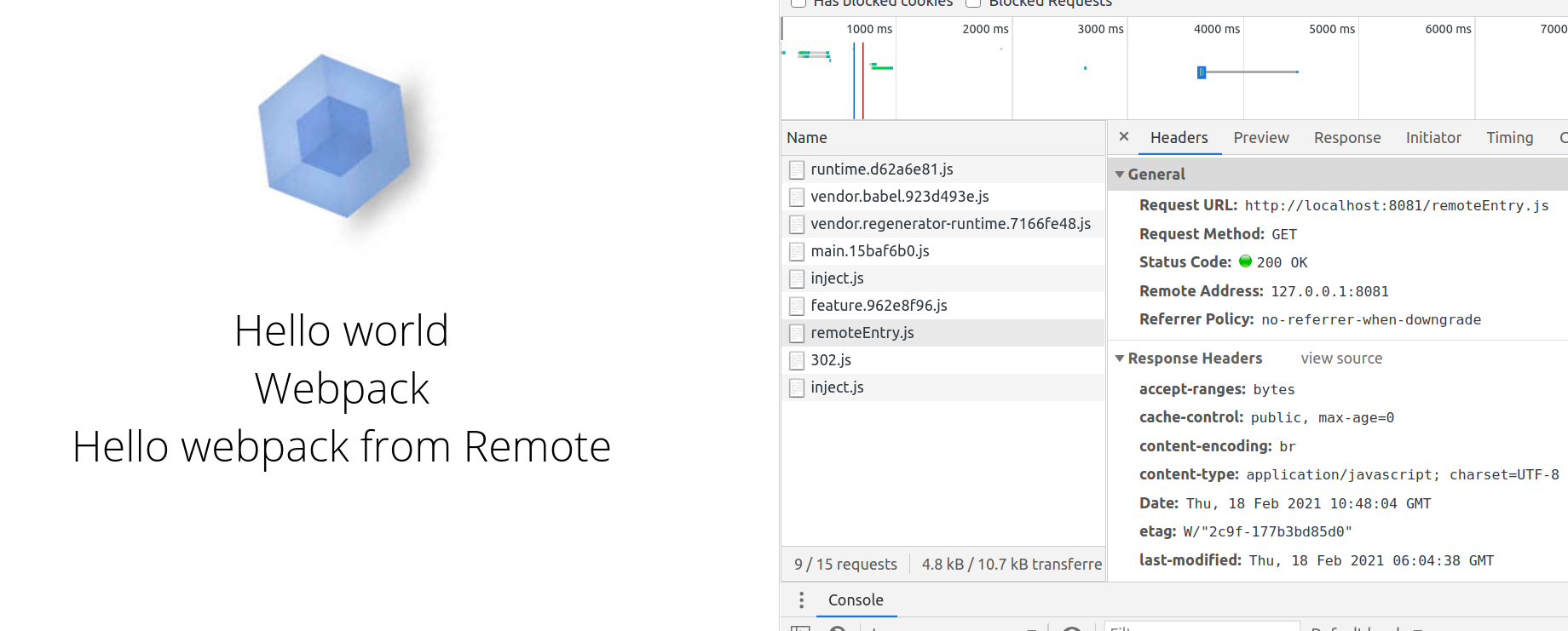
As you can see in the Network tab, the remoteEntry.js module file was loaded first from the remote application (app2). Right after, the 302.js chunk that accompanies it in the same build was loaded remotely as well.
Shared modules #
Module federation allows multiple modules from different applications to be shared. This might introduce a problem of over‑inflating the number of files the browser downloads.
For example, application A loads remote module b from application B. Module b uses some 3rd party dependency - module c. Both b and c get downloaded by A. If A also has c as its own 3rd party dependency for local modules, browser will download c twice (once for local modules, once for remote c). If module c is used in different versions (one for A, one for B), that is fine. By different versions we mean SemVer rules[5]. But overinflating happens when versions are the same (SemVer compatible).
Webpack solves this problem with shared modules.
A container is able to flag selected local modules as "overridable". A consumer of the container is able to provide "overrides", which are modules that replace one of the overridable modules of the container. All modules of the container will use the replacement module instead of the local module when the consumer provides one. When the consumer doesn't provide a replacement module, all modules of the container will use the local one.
And regarding versioning specifically[6]:
Apps A, B, C all have lodash shared. However, B has a newer version installed, and according to the SemVer specifications of A & C, they are compatible with a more up to date minor version of lodash. At this point, remote B will vend its version of lodash to the host and all other remotes who meet the requirements and can consume a slightly newer version of lodash.
Let's see how we can simulate this problem and solved it with webpack.
src/utils/index.ts #
Say that our initial application app uses 3rd party dependency - date-fns for the formatted Date output. Assuming application app2 also uses date-fns for its own purposes (same SemVer), we can configure both apps to share date-fns module.
// ...
export const formatOClockDate = (date: Date): Promise<string> =>
    import('date-fns')
    .then(({ format }) => format(date, "h 'o''clock'"))
We added a new formatOClockDate lambda toapp/utils that returns formatted o'clock time.
Notice that we import
date-fnslazily viaimportinstead of the direct import at the top of the file. Recall:It's not possible to use a remote module without a chunk loading operation. So we have to loaddate-fnslazily.
src/app/index.ts #
import { toCapital, createFrame, formatOClockDate } from '@utils'

//...

formatOClockDate(new Date())
  .then(list.addItem)
  .catch(console.log)
Using the method above, we are adding its output to the screen using list addItem method.
webpack/parts.ts #
// ...
new ModuleFederationPlugin({
    name: "app1",
    remotes: {
        app2: remoteAppUrl,
    },
    shared: ["date-fns"]
})
For the config, we just need to define shared module(s).
app2/webpack.config.js #
// ...
new ModuleFederationPlugin({
  name: "app2",
  filename: "remoteEntry.js",
  exposes: {
    "./Text": "./src/text-component",
  },
  shared: ["date-fns"]

})
app2 config looks very similar. In fact, we are defining exactly the same line for shared modules.
app2/src/text-component.ts #
import { format } from 'date-fns'

export const Text = (data: string) => `${data}: Today is ${format(new Date(),  'EEEE')}`;
We changed the body of the Text component to use date-fns formatting to display day of the week.
Notice how
date-fnsis imported directly and not lazily. We moved lazy loading logic to the file that uses text-component directly.
app2/src/index.ts #
import('./bootstrap')
We changed the body of the index file by moving it into the file called bootstrap and import it lazily. This is only needed if we want to check how Text component looks as part of the app2. The app needs to load it, but because it is marked as shared it has to be loaded lazily.
app2/src/bootstrap.ts #
import { Text } from './text-component'

function component() {
  const element = document.createElement('div');

  element.innerHTML = Text('Hello webpack');

  return element;
}

document.body.appendChild(component());
Test run shared modules #
This time, when we build both applications in production mode, the output includes shared module entries:
app
...
provide shared module (default) date-fns@2.17.0 = ./node_modules/date-fns/esm/index.js 42 bytes [built] [code generated]
remote app2/Text 6 bytes (remote) 6 bytes (share-init) [built] [code generated]
external "app2@http://localhost:8081/remoteEntry.js" 42 bytes [built] [code generated]
consume shared module (default) date-fns@^2.17.0 (strict) (fallback: ./node_modules/date-fns/esm/index.js) 42 bytes [built] [code generated]
app2
...
  ./node_modules/date-fns/esm/index.js + 232 modules 513 KiB [built] [code generated]
  ./src/text-component.ts 113 bytes [built] [code generated]
provide shared module (default) date-fns@2.17.0 = ./node_modules/date-fns/esm/index.js 42 bytes [built] [code generated]
consume shared module (default) date-fns@^2.17.0 (strict) (fallback: ./node_modules/date-fns/esm/index.js) 42 bytes [built] [code generated]
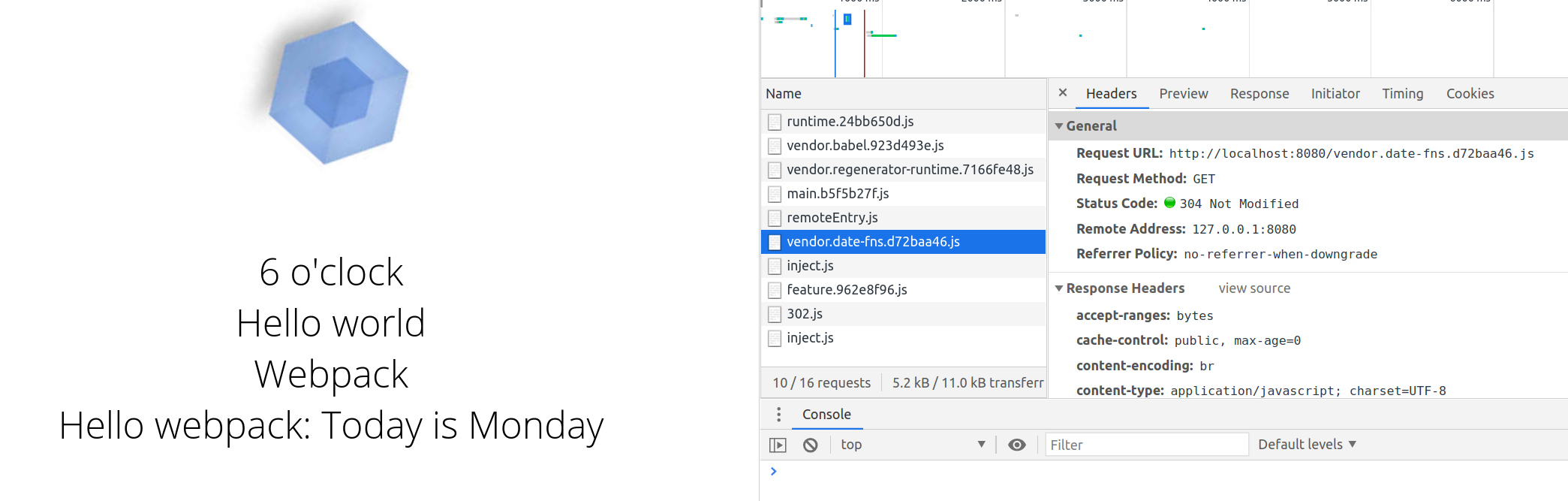
But at the same time, when the application loads, date-fns is downloaded only once from local modules
Use cases #
What we've seen so far is just a fraction of what cold be designed using module federation. Here are some ideas:
- Vendor sharing - share exact vendor modules across different non connected applications
- Component library - similar to vendor sharing but is specific to proprietary modules to be used across multiple applications.
- Micro-frontends via host - different applications are loaded dynamically via a
hostapplication upon some user actions. - Independent micro-frontends - different applications form a chain were an entry loads only entries it knows about (decentralized host).
- Dynamic behavior overriding - different remote modules are loaded upton specific logic within the application to provide different behavior. For example, for different users/tenants application might look/behave different (plug-able architecture).
Final version #
Reference implementation (opens in a new tab)
References
- Webpack 5 release (opens in a new tab) · Back
- Module Federation (opens in a new tab) · Back
- Micro-frontends approaches (opens in a new tab) · Back
- npm v7 peer dependency algorithm (opens in a new tab) · Back
- SemVer rules (opens in a new tab) · Back
- Module Federation advanced API (opens in a new tab) · Back