DevOps
With all the pieces of the application at hand, we are ready to lay out the CI/CD pipeline architecture.
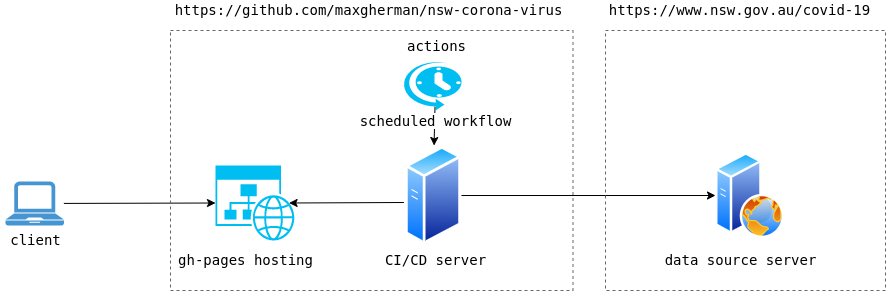
Hosting #
For the simplicity of usage and zero‑payment service, we are using GitHub Pages[1]. According to the service, we need to specify a branch that will hold the compiled application. The rest is taken care of for us (excluding custom domain, more on this later). Since the master branch is already used by the application source code itself, we can use a second option — the gh-pages branch.
Deployment #
Manual deployment process looks simple.
- Data files are downloaded from the public data source
- Data files are saved into the
publicfolder - The application is built into the
buildfolder that is excluded from source control tracking - Application source code is cloned into a separate folder from remote (
gh-pagesbranch only) publicfolder content from original application source folder is copied to the new clone- Commit and push of the
gh-pagesbranch to remote is executed
Unfortunately this process would work only once. Next time, when we execute the same sequence of steps, previously saved data source would be overridden. At the second step, when we save downloaded data to the public folder, we are not taking care of previously saved information.
So the new/fixed process looks like this:
- Download data files
- Download previously saved data files (from github using
raw.githubusercontent.comserver) - Merge new data files into old data files
- Save merged data into the
publicfolder - Build the application
- Clone
gh-pagesbranch from remote - Copy
publicfolder contents intogh-pagesclone - Commit and push
Actions #
Besides hosting, GitHub will help us automate the deployment process as well. It provides a feature that does exactly what we are looking for — automating the workflow described by the deployment steps. This feature is called Actions[2] and is turned on automatically when repository source code contains a specific execution script with all the steps.
It is possible to automate all the steps we need as is, but for the gh-pages branch deployment we are going to use an existing step built by somebody else[3] (there is no need to reinvent the wheel). Different actions can be imported into the workflow from different repositories for the purpose of reusability. We are taking advantage of this option as well.
Here is how our actions look in the workflow:
Check out source code #
Checking out source code is a built‑in action; we just need to use it
- uses: actions/checkout@v2
Set up Node.js environment #
The Node.js step is also built‑in but requires extra configuration to specify the exact version of Node to be used
strategy:
  matrix:
    node-version: [14.x]

...

- name: Use Node.js ${{ matrix.node-version }}
- uses: actions/setup-node@v1
  with:
    node-version: ${{ matrix.node-version }}
Load data #
Next is a custom action that represents a JavaScript file executed for a particular step. In our case, it's a file that is part of source control. It loads, merges, and saves data.
- uses: ./.github/actions/load-data
Install dependencies #
After data is saved, we have to prepare the source code for compilation by installing necessary third‑party dependencies.
- name: Install
  run: npm ci
Build #
While building the application we need to provide all the required environment variables. Variables that should not be exposed to the public are taken from GitHub secrets[4].
- name: Build
  run: npm run build --if-present
  env:
    REACT_APP_MAP_TOKEN: ${{ secrets.MAPBOX_KEY }}
    REACT_APP_DATA_URL: .
    REACT_APP_GITHUB_URL: https://github.com/maxgherman/nsw-coronavirus
Deploy #
Deployment itself represents an invocation of the action we exported into the workflow previously
- name: Deploy
  uses: peaceiris/actions-gh-pages@v3
  with:
    deploy_key: ${{ secrets.GH_PAGES_DEPLOY_KEY }}
    publish_dir: ./build
    publish_branch: gh-pages
    cname: nsw-coronavirus.js.org
Custom domain #
By default, GitHub Pages provides publishing under the github.io domain[5]. The final URL includes the username and repository name
GitHub hosting URL for user repositories: http(s)://
user.github.io/repository
Specifying a custom domain requires a few more details. As you might have noticed, the previous step has one of the parameters called cname. This parameter instructs the step action to create a file called CNAME at the root of the repo with one single line nsw-coronavirus.js.org. Essentially, this file represents a CNAME record[6] that links one DNS entry to another so that requests to nsw-coronavirus.js.org are resolved by http(s)://user.github.io/repository. Finally, we need to instruct js.org DNS servers about the linking between js.org and github.io. There is a project that does just that for free. The only thing we need is to create a pull request following the provided instructions[7].
References
- GitHub Pages (opens in a new tab) · Back
- GitHub Actions (opens in a new tab) · Back
- Deploy to gh-pages action (opens in a new tab) · Back
- GitHub secrets (encrypted) (opens in a new tab) · Back
- About GitHub Pages (github.io) (opens in a new tab) · Back
- CNAME record (opens in a new tab) · Back
- js.org hosting (opens in a new tab) · Back